Custom Integrations
Integration guides for building with SumUp SDKs and APIs.
Guides in this section cover the basics of SumUp APIs, allowing you to develop a custom integration if SumUp products don’t fully support your use case.
Getting a Sandbox Merchant Account
Section titled “Getting a Sandbox Merchant Account”Create a sandbox merchant account to test APIs without real money:
-
Log in to your SumUp account.
-
Open the drop-down menu between Support and your user panel.
-
Select Sandbox Merchant Account. Your merchant account is now switched to sandbox mode.
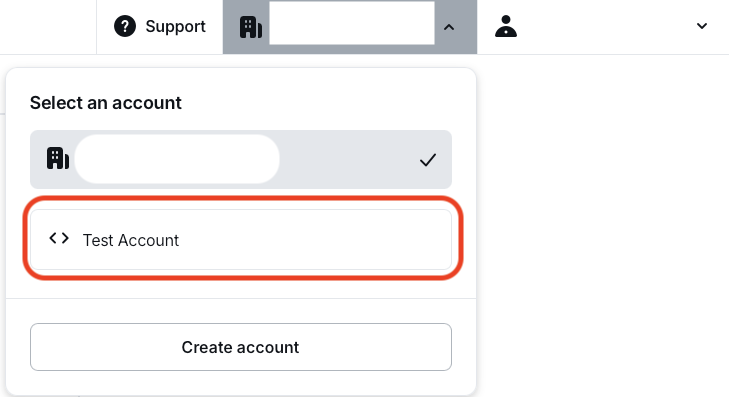
With your sandbox merchant account, begin making API calls with real data. Sandbox merchant accounts do not process transactions with real funds. The sandbox merchant account has a different ID and displays a clear warning. Requests with a value of 11 (in any currency) always fail by design, to test failed transaction scenarios.

When finished experimenting with the sandbox merchant account, switch back to a regular account for business purposes.
SumUp provides official SDKs for Node.js, Go, Python, Java, PHP, .NET, and Rust — visit the SDKs overview page to choose the client that fits your stack.